 Lobby
Lobby  Support
  Casino
SpinBet Login Made Easy
Spin Bet platform is all about bringing players maximum comfort at every stage of the gaming process. And we start right from the most important point: guaranteeing you gain convenient access to account.
With us you get admission into your account on a dime without compromising your privacy and security in any way. Thanks to this, your betting sessions are off to an amazing start.

How to Complete Spin Bet Login Process
Time needed: 2 minutes
Accessing your account allows you to manage deposits, place bets, and track your gaming activity securely. Logging in ensures your data is protected and all features of the platform are available to you on both desktop and mobile devices.
- Open the Website
Visit the casino main page using your preferred web browser. Ensure that the URL is correct.
- Click on “Login”
Locate the “Login” button, typically found at the top right corner of the homepage. Click on it to open the sign-in form.
- Enter Your Account Details
Provide the email address and password you used during registration. Double-check your credentials for accuracy before proceeding.
- Confirm and Access Your Account
Click on the “Login” or “Sign In” button to complete the process. Once authenticated, you will be redirected to your player dashboard, where you can access games, bonuses, and account settings.
Following these steps carefully ensures a smooth and secure login process to Casino Spin Bet. Always use your registered credentials and verify the website address before entering your details to protect your account.
Complete the Sign-In Process
After setting up a Casino Spin Bet account with us, you’ll usually have to supply your login information from time to time. The purpose of this is to ensure that your personal and financial information stays safe and secure.
To that end, users can log in to their profiles when they:
- Access their mobile or PC browser.
- Select the “Login” option.
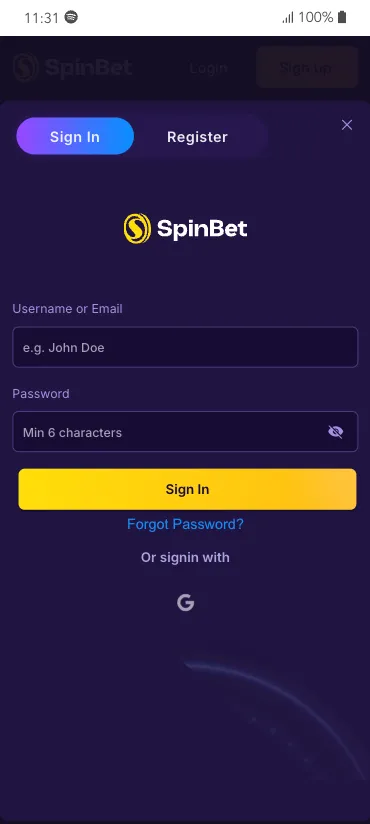
- Enter your username or email.
- Enter your password.
- Select the “Sign In” button.
Alternatively, on the same login page, you can:
- Select the “G” icon.
- Supply your email address.
- Verify it’s you.
- Access your account.
With either approach, you complete your SpinBet NZ login process.
Personal Data Protection
As a KYC-centric online casino, you have to provide some personal information to secure a profile with us. We know fully well it’s our responsibility to safeguard this sensitive data. And, there’s no advanced technological development we don’t employ to achieve this aim.
Security measures we use include:
- Two-Factor Authentication. Also known as 2FA, you’ll be able to apply this multilayered protection feature to secure your account on your end.
- Detailed System Analytics. We also scan our platform consistently to identify and immediately eliminate all security threats.
- Top-Tier Encryption. Our gaming site leverages SSL (Secure Socket Layer) systems to keep your Casino SpinBet login and transactions discreet and untraceable.
Casino SpinBet Login via the Mobile App
Players don’t have to rely exclusively on signing in to their account via our official website. You can just as easily gain entrance through our mobile app as well. Once you’ve downloaded and installed this program on your iOS or Android device:
- Launch the PWA.
- Select “Login”.
- In the “Sign In” tab, provide your login credentials.
- Select the “Sign In” button at the bottom of the page.
And, just as with our official website, you can also use your Google account to complete your Spin Bet Casino login as well.
How to Delete Your Gaming Account
For any number of personal reasons, you might want to close your player account. We’ll be sorry to see you leave. Regardless, we ensure that Kiwi users don’t stress about completing this process.
To close your gambling profile:
- Go to our official website.
- Access your account.
- Click on the profile logo.
- Select the “Responsible Gambling”.
- Select the “Close Account”.
- When the SpinBet pops up, select “Account”.
- Choose “Close Account”.
- Type “Indefinitely” and hit the send button.
- Confirm this action by providing your password.
With this, your account will be permanently closed, and your Casino Spin Bet login will become invalid.
If you’d rather take a break instead of leaving for good, you can do so conveniently, too. On the “Responsible Gambling” page you’ll see the “Take a Break” section. There, you can choose to suspend your account for a day, a week, a month, or three months.


